
Bungalow virtual tours let you walk through a home online, so you can rule out poor fits before you book a showing. Used well, they save time and help you compare layouts side by side. But they can’t show smells, noise or hidden damage, so treat them as a filter, not a final answer.
Key takeaways
- Virtual tours are best for judging layout, flow and room sizes.
- 3D tours and floor plans together give the most accurate picture.
- Watch for what the tour skips, such as the basement or furnace room.
- Always confirm condition, smells and noise in person or through a trusted agent.
What kinds of virtual tours will you see on bungalow listings?
Not every “virtual tour” is the same. Here’s what you’ll usually find on Ontario listings.
| Tour type | What it shows well | Limits |
|---|---|---|
| Photo gallery | Finishes, light, curb appeal | Wide-angle lenses make rooms look bigger |
| Video walkthrough | Flow from room to room | The seller controls what you see |
| 3D interactive tour | Layout, sightlines, ceiling heights | Can hide close-up flaws |
| Floor plan with measurements | Exact room sizes and shape | No sense of light or condition |
| Live video showing | Questions answered in real time | Depends on who’s holding the phone |
The best combination is a 3D tour plus a measured floor plan. Together they tell you how a bungalow really lives.
Why virtual tours suit bungalow buyers
Layout matters more in a bungalow than in almost any other home. Everything happens on one level, so the way rooms connect shapes your whole day. A virtual tour lets you check:
- Whether bedrooms are separated from the kitchen and living room
- How far the laundry is from the bedrooms
- If there’s a step-free path from the garage or front door
- How bright the middle of the home is
- Whether the basement feels like real living space
That’s especially handy for out-of-town buyers or downsizers comparing homes in different cities, such as Barrie, Oshawa and Hamilton, without driving to each one.
Your virtual tour checklist
Go through each tour slowly. Pause in every room and look in every direction. Use this list:
- Ceilings. Look for water stains, cracks or patched areas.
- Windows. Check their size and style. Older windows may need replacing.
- Floors. Note uneven transitions, gaps or patches of new flooring.
- Basement. See the ceiling height, window size and any damp-looking corners.
- Mechanical room. If it’s shown, note the furnace and water heater style.
- Electrical panel. A quick look can tell you if it’s been updated.
- What’s missing. If the tour skips a room, ask why.
Bungalow tip: Use the floor plan to “place” your own furniture. Measure your bed, sofa and dining table first. In a one-level home, a too-small primary bedroom is hard to fix.
How to compare tours and build your shortlist
After a few tours, homes start to blur. A simple system keeps you organized and helps you decide which bungalows deserve an in-person visit.
- Set your deal-breakers first. Write down the three or four things you won’t compromise on, such as main-floor laundry or a separate entrance.
- Watch each tour twice. The first time, get a feel for the home. The second time, look for problems.
- Take screenshots. Save images of rooms you love and anything that worries you.
- Score each home. Rate layout, light, basement and outdoor space out of 10.
- Book showings for your top picks. Group them by area so you can see several in one trip.
Our home comparison tool makes it easy to line up your favourites side by side, including price, lot size and features.
Red flags a virtual tour can reveal
Some issues show up clearly on screen, even before a visit:
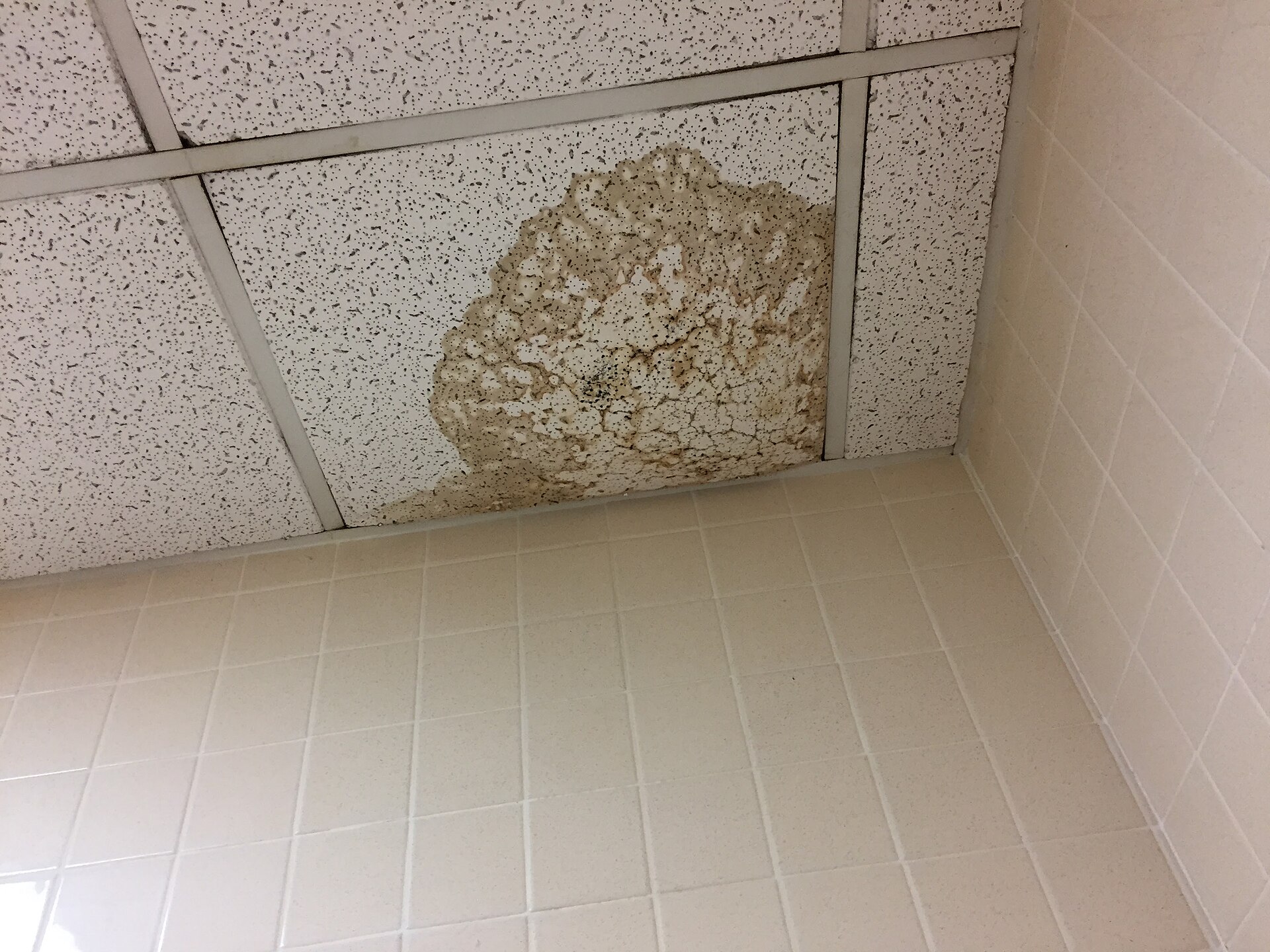
- Fresh paint on only one ceiling patch, which can hide a past leak
- Dehumidifiers running in the basement
- Rugs placed in odd spots, which can hide floor damage
- Closed doors or a basement that’s left out of the tour
- Very tight framing that avoids showing neighbours or the street
None of these means you should skip the home. They’re simply questions for your agent before you book a showing.
What virtual tours can’t tell you
A screen can’t share the full experience. You still need to confirm:
- Smells, like must, smoke or pets
- Noise from traffic, neighbours or a nearby highway
- The street and neighbourhood, including parking and nearby buildings
- Condition up close, such as soft floors or drafty windows
- The home’s systems, which need a professional inspection
If you can’t visit, ask your agent to do a live video showing for you and to point the camera at everything on your list. Then book a professional home inspection before you firm up.
Frequently asked questions
Can I buy a bungalow based only on a virtual tour?
You can, but it’s risky. If you can’t visit, use a live video showing, an inspection condition and a trusted agent to fill the gaps.
Are virtual tour measurements accurate?
Measured floor plans are usually close, but they aren’t guaranteed. Measure key rooms yourself during a showing if exact sizes matter.
Why don’t all listings have a 3D tour?
It’s the seller’s and listing agent’s choice. If a home you like has no tour, ask your agent for a live video walkthrough.
The bottom line
Virtual tours are a great way to shrink a long list into a short one. Use them to judge layout and flow, then confirm condition and feel in person.
Start by browsing bungalows for sale across Ontario, save the ones you like, and try our bungalow swipe tool to sort favourites fast. If you’re curious about where this tech is heading, read about augmented reality in home buying.